Showing posts with label keypad. Show all posts

Thursday, May 15, 2014

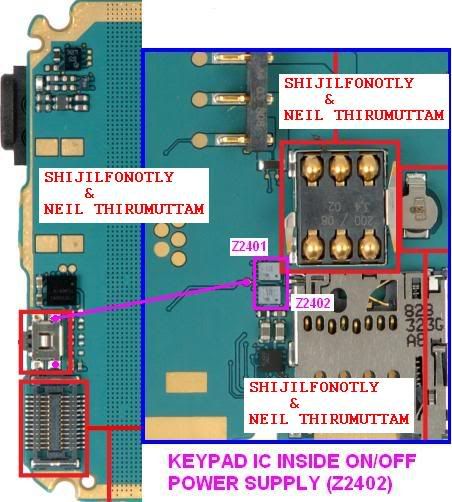
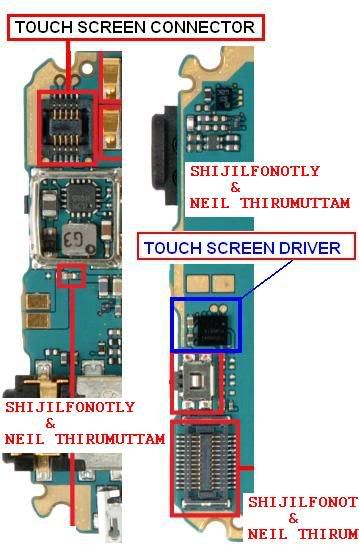
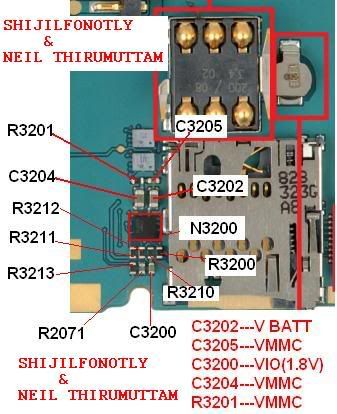
6208c 6202c On Off and Keypad Solution


NOKIA LASTEST MODEL 6208c_6202c_RM-458

KEYPAD AND ON/OFF

DISPLAY
TOUCH SCREEN
MMC
Read More..

Tuesday, May 13, 2014

Saturday, November 23, 2013

Nokia 5130 keypad solution keys and switches connection tracing guide for repair

Nokia 5130 keypad solution, keys and switches connection tracing guide for repair

Heres the Nokia 5130 complete keypad solution, this solution shows each certain keypad key connections including the button switches such as the volume up and volume down control buttons and also the MP3 player button switches such as the Start/stop, forward and rewind button switches.

The solution may help repair and fix nokia 5130 keypad malfunction and button switches failure. You may check, trace particular keys which are not able to function by using the repair guide below. Each group of colors indicates that they are connected with each other. So just locate where that particular non working key being connected and mend it found cut or open.

Nokia 5130 xpressmusic keypad keys malfunction full tracing solution
nokia 5130 keypad key jumper ways full tracks


The Power ON/OFF key is isolated and not connected to other group of key connection for it only holds for switching or powering up the device. There is an open spots near the keypad filter IC that the power ON and OFF key can be connected when the power key fails or or if the line is cut or open.

Nokia 5130 ON-OFF power key jumper ways 
nokia 5130 power on and off jumper ways


And heres the internal connection of the keypad filter IC, you may check and apply a temporary jumper on this components to ensure that the inner line paths from the application processor is not being damaged.

Nokia 5130 keypad filter IC jumper ways 
source 
nokia 5139 keypad filter Ic jumper ways

source and spcial thx for gsmangel-nokiaharware.blogspot.com
Read More..

Tuesday, November 19, 2013

Nokia C2 03 Keypad Light LED Problem Solution

Nokia C2-03 Keypad Light LED Problem Solution

In this solution we show you the Nokia C2-03 keypad LED light components which is useful to fix when the  keypad LED failed to work. There are two white LED light used in in illuminating the keypads, it may also get damaged due by water, wet or cause by oxidation build ups.

The solution below shows the connection line paths of the two white LEDs which is more convenient in tracing broken spots. It also shows which nearby particular components it is being connected or part of the keypad back lighting circuit.

Heres the some hints that may preferably help fix in troubleshooting Nokia C2-03 keypad back light failure. 

1. Check the whole area and surrounding components for the keypad white LED for possible damaged, cracks, oxidation etc. Clean it first if necessary.
2. Check both of the two LEDs using a multimeter. Replaced if already damaged.
3. If the LEDs light are still working check the (VBAT 3.7V) battery voltage line paths.

Nokia c2-03 keypad light jumper ways
Nokia C2-03,C2-06,C2-08 Keypad light problem Solution
4. Check each of the LEDs positive and negative connections.
5. Check the  connected resistors and coils, re-solder or replace if damaged
6. Check the LED driver transistors. Re-work or replace if necessary.
View larger picture here.

This solution may also works on Nokia C2-06 and Nokia C2-08 since they both similar PCB board layout with Nokia C2-03 a Dual SIM card built in capability and a slider phone.
-->
Read More..

Saturday, November 16, 2013

Nokia E50 Keypad ic Jumper Ways

Nokia E50 Keypad Not Working Solution
Read More..

Tuesday, November 12, 2013

Nokia C2 01 Keypad IC Problem

Nokia C2-01 Keypad
Nokia C2-01 Keypad Problem Solution By Changing Z2550 IC.
Nokia C2-01 Keypad IC Problem
Read More..

Thursday, November 7, 2013

China Mobiles Keypad Hang During Call Problem Solution

China Phones Hang During Call Solution
China Mobiles Keypad Hang During Call Problem Solution
Connect the Extra Wire with Antina 

Read More..

Wednesday, November 6, 2013

Samsung E250 Keypad ic Problem

Change Two Components As Shown in fig.
Read More..

Saturday, November 2, 2013

Keypad Problen in China Mobiles Repairing Guide

China Mobiles Some Keys Not Working Guide 
Keypad Problem in China Phones
First we need to know china phone keypad connected with PCB how way

(A) Direct on PCB

(B) Flex System (flex cable direct soldering pcb to keypad panel)

(C) Flex and socket system include (flex one side soldering with key panel other side connect to pcb with socket)

(D) only Socket System (here have 2 socket, 1 with key panel others with pcb)

Keypad problem have various type

1. All key not work.

2. some key work and some other not work.

3. sometimes work and sometimes not work.

1. All key not work

china phone all key not work for this type of problem
(A) though its touch screen phone, first try to disconnect touch panel line from phone pcb or display flex (4 line)

(B) though not solve and keypad direct on pcb first you try to good clean full pcb with cleaner.

(C) though not solve now you try to format/flash your phone because some time key problem come from software problem.

(D) though still not solve now you check must be CPU. 95% china phone keypad directly going in cpu. and other 5% first going to resistor or capacitor near the cpu or keypad than going to cpu. so now first check them than you can try to re-hot, re-soldering or changing cpu.

(E) though its flex or socket system, first check GND connection continuslay pcb to key panel. next check full flex or socket all line going continuously pcb to key panel or not. also sometimes flex or socket shorted with other line or gnd so check also them.

(F) Also you can check all key anyone is short 2 line.

(G) sometimes keypad line broken from cpu pin on pcb to key panel, so check them.

2. Some key work and some other not work
Some key work and some other is not work for this type of problem

(A) maximum time this problem we face for flex or socket system keypad. so check flex cable and socket all line any line is broken or not and though need change them. and check all key connection on key panel.

(B) though its direact on pcb, some of key line broken internaly. and maximum china phone have alternative test point near every key or with other key on keypad. so check them with multimeter and though need connect to not work key with near testpoint or other working key.

(C) common problem is keypad metal ball (which is short 2 line on key when we press) sometimes its damage for phone water damage or over key voltage, so clean them or change.

(D) also try to check line continuously from cpu to not working key.


3. sometimes work and sometimes not work
this problem come from this defect

(A) flex or socket system keypad any line is bad soldering or do lose contact. check them and
re-soldering or keep there line join with extra ware.

(B) for cpu bad soldering or cpu pin is broken. so re-hot or re-ball cpu.
Read More..

Saturday, October 26, 2013

Wednesday, October 23, 2013

China Mobiles Keypad Hang During Call Problem Solution

China Mobiles Keypad Hang During Call Problem Solution

China Phones Hang During Call Solution
undefined
China Mobiles Keypad Hang During Call Problem Solution
Connect the Extra Wire with Antina
Read More..

Wednesday, October 16, 2013

nokia 5130 keypad ic jumper

nokia 5130 keypad ic jumper

nokia 5130 keypad jumper

just follow the diagram..


tested just now..


after doing the jumper..


all keypads working well..
Read More..

Monday, October 14, 2013

China cherry mobile D11 keypad ways problem Solution

First Try To Rehot Ic As Shown in picture
Then Try To Jumper

Read More..

Friday, October 11, 2013

Sunday, September 29, 2013

blackberry 8320 keypad new solution


blackberry 8320 keypad new solution...

Read More..

Monday, September 16, 2013

Nokia C5 Keypad IC Solution

Nokia C5 Keypad IC Solution
Read More..